Improving communication between landlords and tenants.

Creating an automated messaging tool tailored for our users.

Project Overview.

At MachoBear Studios, we build a rental platform with features that simplify the process for landlords and tenants.

Our customer success team received complaints from tenants about landlords' slow response times, often taking weeks to reply to messages. Based on this feedback, the team and I developed two hypotheses:
  1. The delayed response could mean that landlords are potentially losing out on tenants due to the lack of communication
  2. Landlords might be overwhelmed by having to write up similar messages multiple times.
To address this, we decided to create an automated messaging tool.
Goal.
Our goal was to minimize response time issues and reduce friction in communications between our landlord and tenant users.
Because this issue was brought up by the customer success team, this feature was not properly scoped out at the beginning. I decided to work closely with the project manager to do some research and properly scope out the feature once research was done.
Exploring & Expanding the Feature.
The team and I discussed the problem and possible solutions. After brainstorming, we came up with the solution of allowing users to create messages connected to different triggers. After the discussion, I started doing competitive research, looking at both direct and indirect competitors to see if they had an automated messaging tool and if so, how did it work.
I discovered that none of our direct competitors allowed automated messaging, which meant that adding this functionality would differentiate us from the rest.
I presented my findings to the stakeholders, highlighting commonalities and differentiators that we want to use. Then, I workshopped with the team in order to develop our user stories and feature scope. Ultimately, we decided to add in the extra functionality of allowing users to assign listings to different messages, in order to allow landlords more flexibility.
Screenshot of figjam board with research
Finalizing Scope & Defining Key Features.
After it was decided that the scope would include allowing users to assign listings, the team and I started working through the different triggers and variables that would be useful for both our landlords and users. We first started noting down the important actions our tenants take from inquiry to contract signing, then did the same for our landlord users.
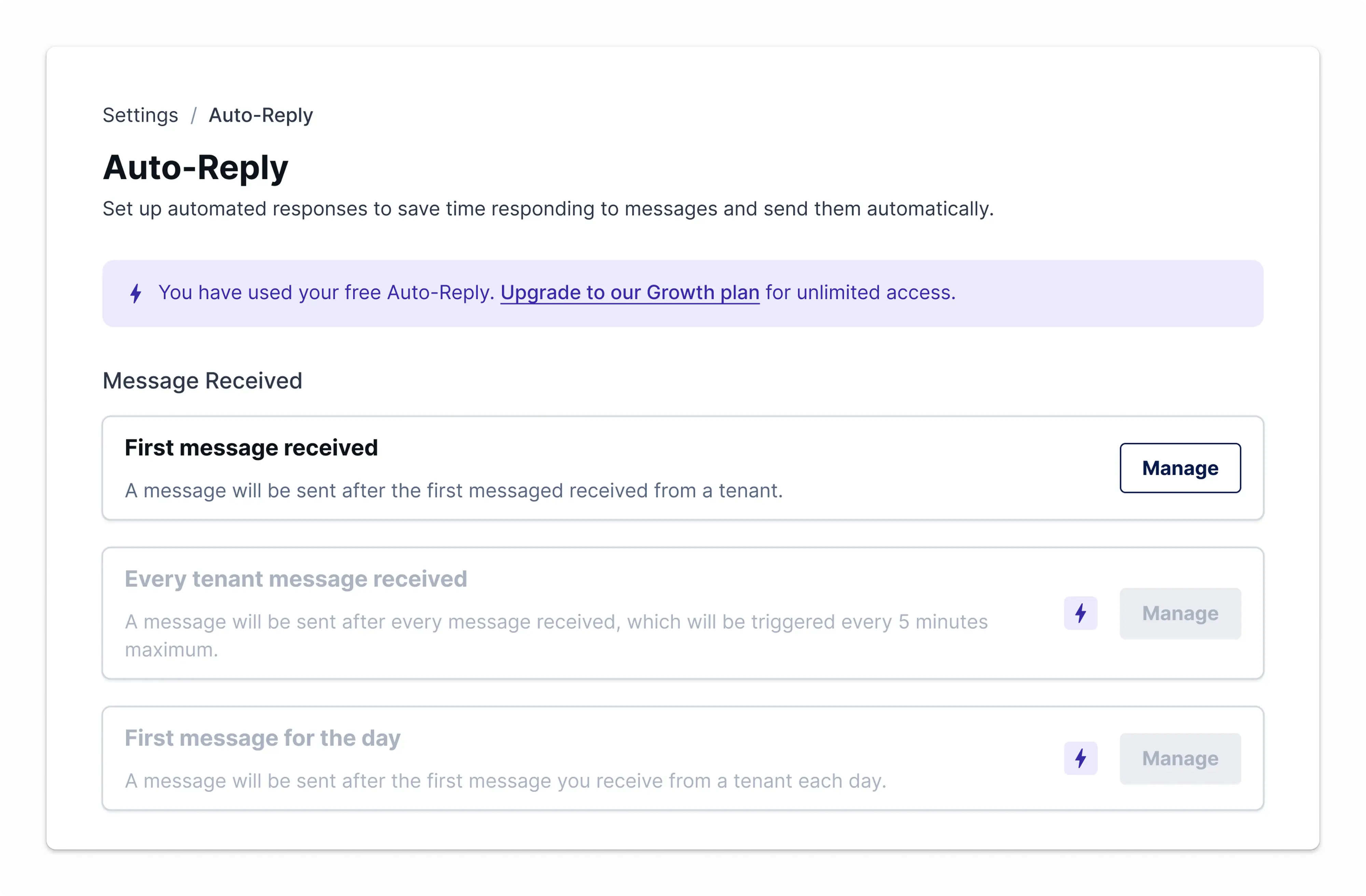
When a list was created, we also discussed how to differentiate this feature for our free users and our paid users. After discussions and taking the business goals into consideration, we decided to limit the number of automated messages for our free users to help encourage them to upgrade to our paid tier.
Screenshot of figjam board with research
Messaging Made Easy.
I decided the best way to allow users to create a message and assign listings was to break it down into 2 different steps. Since none of our direct competitors did this, I spent time researching the best way to do this. After going through other platforms with automated messaging, forms, and steps, I realized that using a step format would work best for our users.
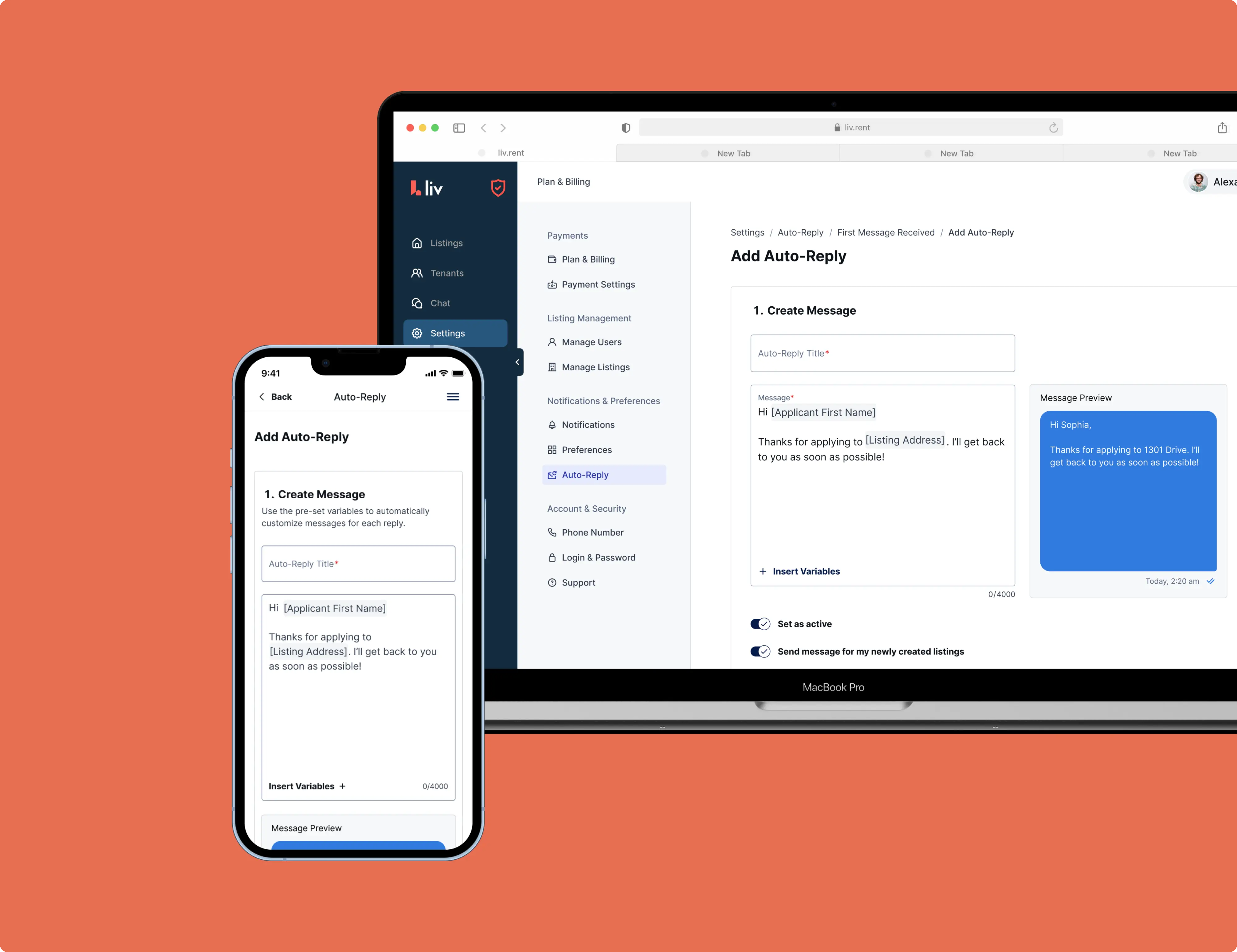
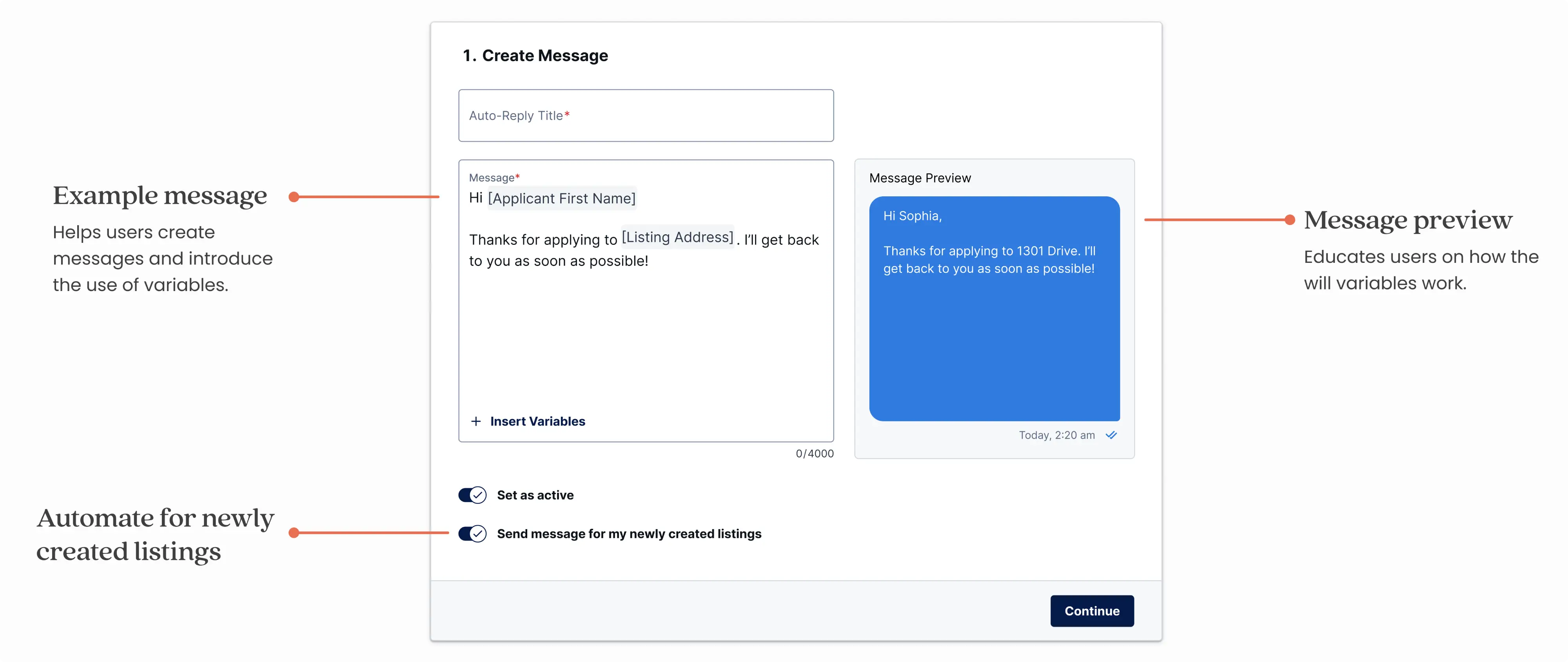
The first step, which is to create the message, was fairly simple and straightforward. We needed to allow our users to not only type the message but to select data variables to allow the message to be more personalized.
Mobile mockups
Perfecting the Listing Assignment Flow.
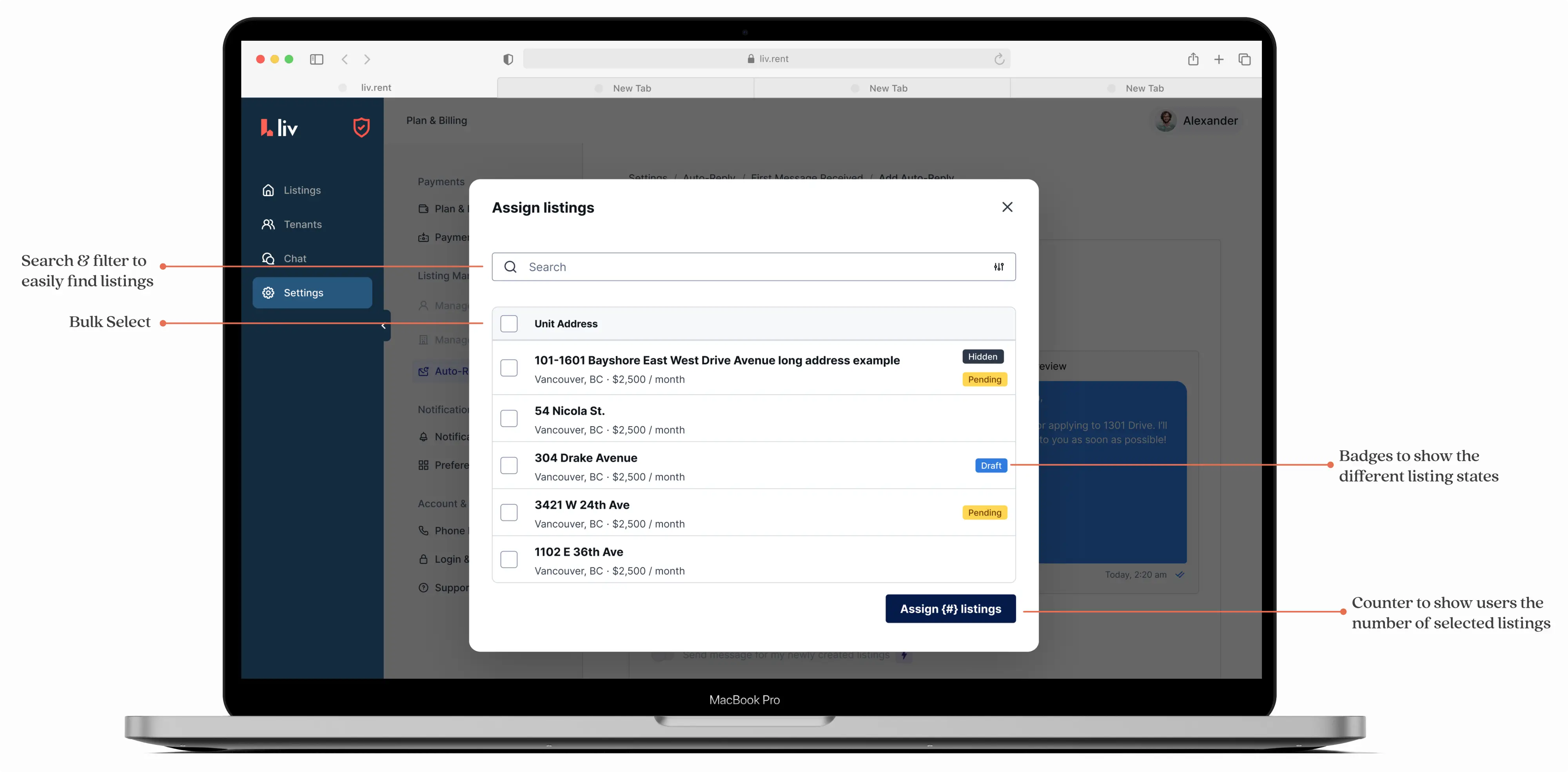
The challenge was determining how to allow users to assign listings. While exploring different design options, it became clear that our competitors had avoided this feature due to the complexity of implementation, ensuring users could assign listings easily while maintaining a seamless experience on both desktop and mobile. Another blocker we faced was accommodating the different listing states for each listing within our design.
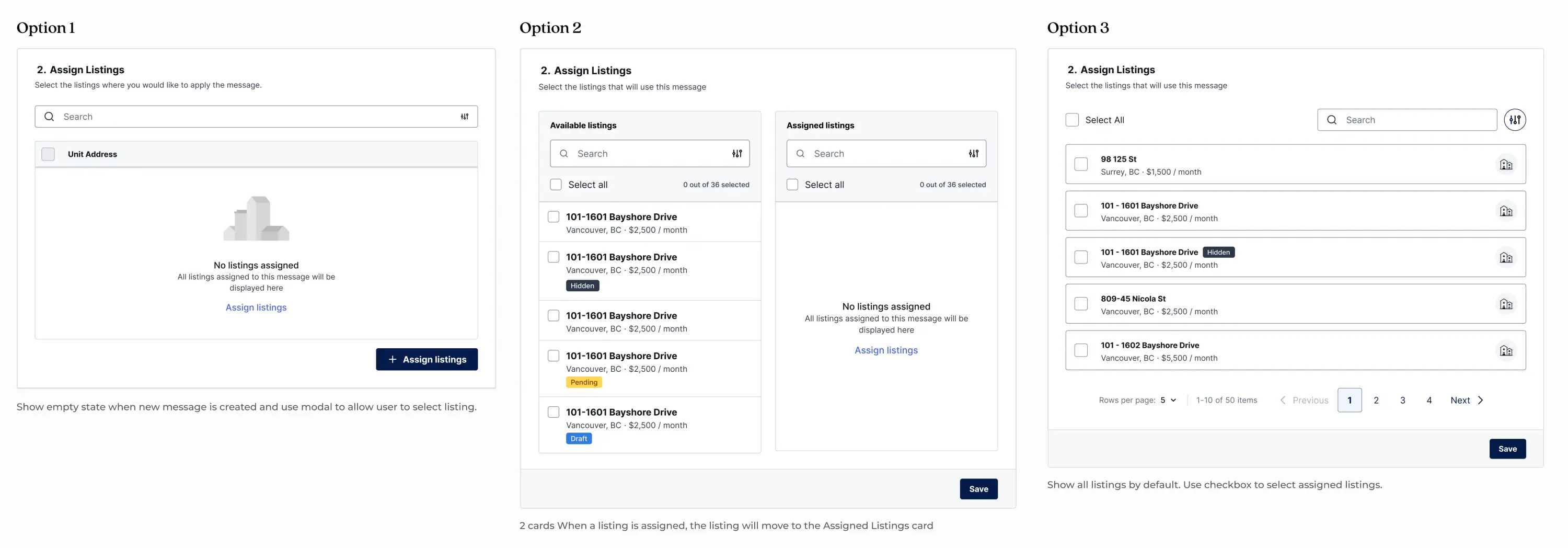
Our data showed that most of our users access the platform via desktop. Because of this, we prioritized making the assignment functionality as user-friendly as possible on desktop while doing our best to optimize it for mobile. I created 3 design options and decided to perform user testing.
Refining the Flow Through Testing.
Due to time and budget constraints, we conducted user testing with our customer success team rather than end users, using prototypes for each design. Each prototype received mixed feedback, with testing rounds providing valuable insights that guided the final design selection. I ultimately chose option 1 for these key benefits:
  • Reduced confusion during testing
  • Offered the simplest, most intuitive flow
  • Created less friction for users
  • Gave us more room to educate our users
Delivering a Seamless Messaging Experience.
The Auto-reply feature emerged through close integration and collaboration with the customer success team. This project highlighted the value of flexible communication, scope, and design—showing how initial plans can evolve significantly. Strong communication and partnership with both development and product teams proved essential to the feature's success.
In the end, we developed an automated messaging feature that shortened response times between landlords and tenants. Follow-up with the customer success team revealed that while exact metrics weren't available, response time complaints dropped by approximately half.
Other Projects.

A Tenant Application Tool for Better Matches.

Designed an all-in-one comprehensive application tool, increasing user sign ups by 8%.
View Project

Streamlining Food Safety & Compliance.

Increased kitchen staff and registered dieticians productivity with their day to day tasks.
View Project